Your whole school's week, in one place.
Homework, the school calendar, notices, attendance and messages between teachers and families. One simple site, set up the way your school works, on every phone and in the languages your families read.
For every kind of school and community: elementary, middle and high school, independent and public, weekday and weekend.
- MonSpelling words, list 8Practice sheet attached · due ThursdayHomework
- TueBen won't be in until 11Reported by his dad on SundayAbsence
- WedField trip: Vancouver Aquarium18 of 22 families have signed the permission slipNotice
- ThuMath quiz: adding to 100Practice pages in the workbookTest
- FriNo school: professional development dayOn every family's calendarSchool closed
What it replaces
Most schools run on a patchwork of email threads, group chats and paper. Here's what changes on the first day.
Chasing email threads and group chats to find out what was assignedHomework has one home
Teachers post it once, with worksheets and audio. Families and students see it on their phones, and tick it off when it's done.
Printing worksheets that come home crumpled, or not at allFiles travel with the homework
PDFs, Word documents, pictures and recordings are attached to the assignment, so nobody needs a printed copy to get started.
No single calendar. Every class announces its own datesOne calendar for the school
School closures, events, tests and class dates sit on one calendar each family can filter to their own children.
Absences texted to whichever teacher's number a parent hasAbsences reported in two taps
Parents report an absence ahead of time. Teachers see it before class, take attendance on their phone, and the office sees the whole school.
Notices nobody confirms reading, and slips that never come backNotices with a read receipt
Send a notice to the school, a grade or one class. Ask families to confirm, see who hasn't, and remind only them.
Families who read another language missing messages written only in EnglishEveryone reads it in their language
Each person chooses the language they read, left to right or right to left. Messages and notices can be translated with one tap.
One site, four views
Everyone signs in to the same site and sees only what's meant for them.


Teachers
- Post homework and dates in a minute
- Take attendance from the dashboard
- Message one family or the whole class
- Give badges that reach home
Parents
- See every child's week on one screen
- Report absences and sign slips
- Message teachers directly
- Two parents can each have their own sign-in
Students
- Their own sign-in from grade 3
- Homework, calendar and course notes
- Badges from their teachers
- Older students can write to teachers, and parents can read it
The school office
- Add families one by one or from a spreadsheet
- Send school-wide notices
- See attendance across every class
- Turn on carpools and hot lunch when you're ready
See it with a school like yours
Made-up schools, filled with a term's worth of classes, homework and messages. Sign in as a teacher, a parent, a student or the office with one click.
Elementary school
Homeroom classes, daily attendance, field trips, hot lunch and a busy family calendar. Younger children see everything through their parents.
Open the elementary demo Grades 6 to 8Middle school
Students get their own sign-in and can write to their teachers, with parents able to read along. Attendance in every class, not just homeroom.
Open the middle school demo Grades 9 to 12High school
Subject teachers, flex blocks and course outlines, with students who manage their own homework and deadlines.
Open the high school demo Evenings and weekendsCommunity and weekend programs
Language, faith, arts and enrichment classes run by volunteers, with mixed ages and families who read different languages.
Open the weekend demoThe demos reset every night, so try anything you like.
Set up the way your school already works
No two schools run the same way, so InClassHub doesn't ask you to change. Your school chooses what's switched on, and everyone else sees a simple screen with only what you use.
Only what you need
A small program might start with homework and messages. A large school adds attendance, hot lunch orders and carpools. Anything you don't use stays out of sight, so teachers aren't wading through options.
Right for every age
Tell us which grades you teach and each student gets what fits their age: parents handle everything for young children, older students get their own sign-in, and secondary students can write to their teachers.
Your name, your address, your languages
Your site carries your school's name at its own address, in the languages your families read. Families see their school, not ours.
Changes as you grow
Switch features on or off from the office at any time, with nothing to reinstall. And pilot schools help decide what we build next.
- Grade levelsMiddle and high schoolGrades 6–12
- AttendanceTaken in every class
- Students message teachersParents can read along
- Flex blocksStudents sign up for sessions
- Hot lunch ordersMenu, deadlines and payments
- CarpoolsFamilies share rides
- LanguagesWhat families can chooseEnglish, French
- Microsoft TeamsPost homework to class channels
Every family, in their own language
Each person picks the language they read, and the whole site follows: menus, buttons, dates and the calendar. Arabic reads right to left, so the layout turns around with it, not just the words.
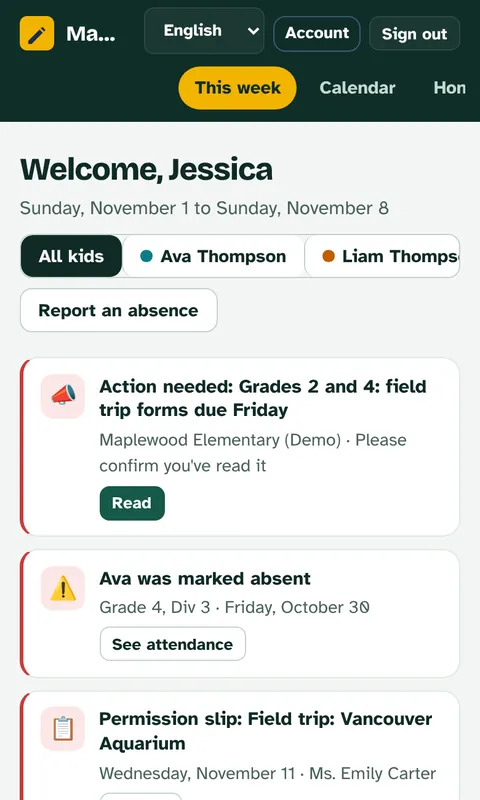
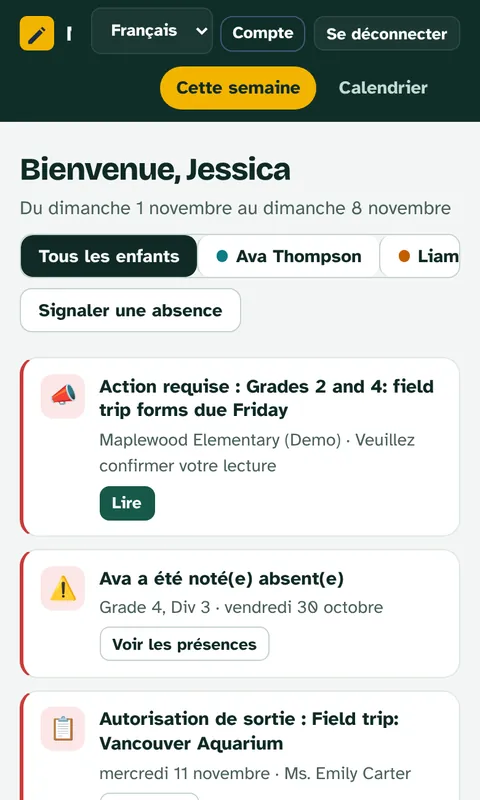
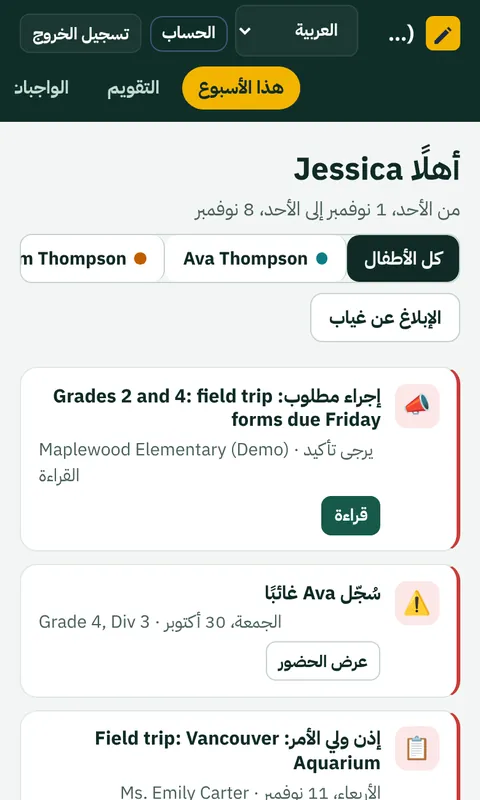
Each person chooses
A parent can read in Arabic while the teacher writes in English and the office works in French. Nobody has to agree on one language.
Both directions, done properly
Right-to-left isn't bolted on. The layout, menus, buttons and dates all follow the reader, and mixed English and Arabic text stays readable.
Translate with one tap
Messages and notices can be translated into the reader's language right where they are, so a note from the teacher is never lost in translation.
Your portal, your school, your language. Built for everyone, no matter their native tongue.
Built for schools that look after families' information
Your school's own space
Every school gets its own site and its own database. Nothing is shared between schools, there are no ads, and families' information is never sold or used for anything else.
Private by design
Families join with your school's code or a link from the office. Staff can turn on two-step sign-in. Admins can't read private messages between teachers and families, and every sensitive action is logged.
On every device
It's a website, so there's nothing to install. It works on phones, tablets and computers, and families can add it to their home screen for notifications.
Start with one class
You don't need to move the whole school at once. Most schools begin with a single class for a month, then decide.
We set up your school's site
Your own address, your school's name, and the languages your families read. It takes a day.
One teacher and their families try it
Add the families from a spreadsheet or let them sign up with your school's code. We're there to help the teacher through the first weeks.
You decide what's next
Look at what families used and what teachers think. Add more classes, or stop. Your school's information leaves with you either way.
Tell us about your school
Ask a question, book a short walkthrough, or start a pilot. We reply within two school days.
Prefer email? hello@inclasshub.com